I have been rapidly adding books to my office library recently, and I realized that it’s getting hard to remember which books I already have. Scanning the shelves and other stacks where I may have books isn’t enough, because I also have ebooks from several different sources. Surely there is software that can catalog all of my books? Here I’ll document my experience with a library management app to try to wrangle all of my work-related books.
I did a quick search and decided to try Libib. A free Libib account gives me plenty of features for managing a small book collection. I can use the web interface or a mobile app. Once I set up my account, I grabbed my phone and grabbed a book off my shelf to scan the barcode using the mobile app. The book didn’t have a barcode, but it did have the ISBN printed on the back cover. I set it aside and grabbed another book. Success! The moment the barcode was near my camera, the book was added to my Libib collection.
I was able to add maybe as many as two-thirds of my books by barcode. In a few cases, there were multiple barcodes on the back of the book, so I learned to to slide the camera over from the side that had the ISBN barcode. I had to check the information about each book, though, because there were some misspellings in the title and some missing co-authors. A few titles included the subtitles, but most did not. I added the subtitles in most cases. I found it a little odd that for titles starting with “The,” this word was removed (not just moved to the end for collation purposes), but I left them that way. Several entries did not include cover art, or the cover didn’t match my edition, so I either took a rough picture or found a picture online.
For many of the books I couldn’t add by scanning, I was able to enter the ISBN printed somewhere in the book and that worked. For ISBNs that weren’t in the Libib database, I had add the books manually (the pro version of Libib allows for lookups by Library of Congress number, which the older books did tend to have).
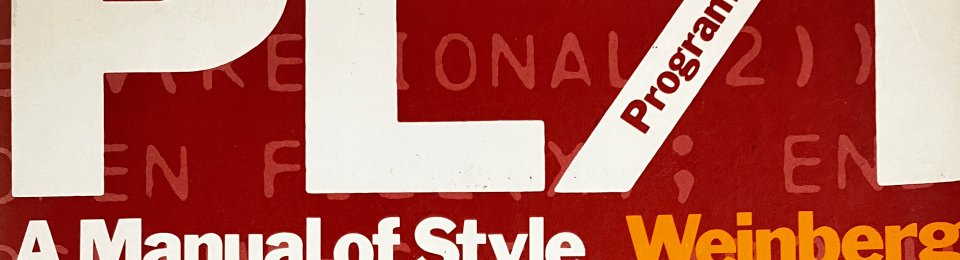
There were a few interesting things about entering books manually. For example, a minor mystery was how to translate this word art into a title:

I settled on “PL/I Programming: A Manual of Style” with an “I” instead of a “1.”
There is a field for the number of pages in the book. I had to do a bit of study to conclude that I was supposed to count everything except the covers, including blank pages and probably the end papers. So I took the last page number and manually counted the pages after that and before page 1. One fun case was the Programming Perl Quick Reference Guide, which had a page number on the inside of the back cover and both inside covers had printing. Then there’s Computer Lib/Dream Machines, revised and updated, which is two books printed back to back and upside down from each other, with two separate sets of page numbers that are added together in the page count (it only has one ISBN and one entry in the database). But I also have a scan of the first edition, which includes Dream Machines in reverse and upside down compared to the physical book so you can read it easily on the screen. There is a separate set of page numbers for Dream Machines, and also a continuing page count for the book as a whole upside down in the opposite corner, counting backwards from the highest page number in the book because of the way the pages were reversed.
There’s an interesting anomaly for the book I am a Bug – the text on the spine is printed from bottom to top. Every other book I have has the text reading down the spine instead of up. I can choose to either keep the rest of the book right side up, or align the spine text the way all the other books on the shelf read (I chose to keep the cover and contents right side up instead of the spine). In any case, it was an easy decision to make the cover picture in my book database right side up.
Several of my ebooks books have ISBNs but none have a barcode to scan. The Kindle ebook Dominating ChatGPT in 30 Days, though, has an ISBN for the print version but not the Kindle version. Books I bought on Leanpub often don’t have an ISBN, though they do have a publication date, which can change often as the book is updated. Examples include Developer Hegemony, and everything by Jerry Weinberg from Leanpub, like What Did You Say?, second revised edition. However, What Did You Say? is also available from Smashwords where it oddly does give an ISBN. The Smashwords version has a publication date of 2013, but Leanpub has an update from 2015. All of the books I’ve bought on Smashwords, however, do not include an ISBN. Here again, I was able to find an ISBN for one of them (Aremac Power: Inventions at Risk), for the Nook version from Barnes & Noble, which might or might not be considered the same publication.
A new category of publication I’ve fairly recently become aware of is the “zine.” I have a handful of these visually-oriented ebook zines that relate to my work, and none of them have an ISBN or any date printed inside. Examples include the “Pocket Guide to Debugging: Stellar strategies for sticky situations” and “How to Quit Vim.”
Most of my ebooks that are faithful reproductions of printed books seem to have proper ISBNs, including those from Pragmatic Bookshelf, Barnes & Noble, Manning, and InformIT. But some from more unusual sources, such as a scan of a 1949 book from Project Gutenburg (Giant Brains; or, Machines that Think) and a PDF sourced from GitHub (Uncurled: everything I know and learned about running and maintaining Open Source projects for three decades) have no ISBN and the publication date was not easy to track down.
By the way, I had to get creative with ebooks in Libib so I would know not to look for them on my bookshelf. I added an “ebook” label to all of my ebooks, and I added a note indicating where I got it from. For books with digital rights management, that tells me what app I have to use to read the book.
I really enjoyed having an excuse to thumb through my books, because I found some interesting things inside. I buy a lot of used books, some of which have a previous owner’s name written inside. I’d really like to talk to them to ask where they were in their career when they used the book. Alas, the person I’m pretty sure I tracked down successfully died in 2008.
I found library stamp cards in several former library books, like The Medusa Conspiracy (bonus points if you know why that one would be in my office library). In Computers in Business, I found an unpunched punchcard, perhaps used as a bookmark. And in The Aramac Project there was a letter I forgot I’d gotten from Dorset House thanking me for proofreading the book. In fact, it strokes my ego to find my name printed somewhere in the front of a book, and in some cases I didn’t even know I had influenced the content of a book. There’s one more going to print soon – stay tuned.
Surely there are established library science practices that have worked out how to solve some of the questions about cataloguing books that I’ve run into. I’d love to hear from people who are familiar with this.
 swalchemist