• About
  • Jerry’s Story

swalchemist

swalchemist

Monthly Archives: June 2016

Username Enumeration – Ho, Hum!

28 Tuesday Jun 2016

Posted by Danny R. Faught in security, testing

≈ 1 Comment

I used to think that checking for username enumeration vulnerabilities was important to do. Based on what I’ve observed, now I’m not so sure.

When I’m conducting a broad test of a software system, I tend to check for basic security holes like username enumeration. “Username enumeration” vulnerabilities happen when software that has login accounts for its users gives you a way to build a list of valid login accounts, for example, by giving you a way to query whether a guessed username is valid or not. Once you have this list, you can try to launch a brute force attack to guess the passwords.

Testing for username enumeration is one of the mitigations recommended in the 2013 OWASP Top 10. Cigital gives it even more prominence in their Top Web Application Security Vulnerabilities Compared to the OWASP Top 10, with username enumeration ranking as the 9th most commonly found, even when only considering the vulnerability via password reset features. My experience, though, is that companies aren’t very interested in fixing these vulnerabilities. It may be commonly found because it isn’t commonly fixed.

Once I did get a fix for an obvious vulnerability, but when I found I could still do enumeration by checking the response time from the server, that didn’t get fixed. I often see no fix at all when I report a username enumeration problem. For example, the main web login form for Instagram has this vulnerability, but Instagram considers your username to be public information, and they confirmed when I contacted them that they’re not going to close this hole. A significant fraction of the companies that participate in the HackerOne bug bounty program specifically state that they exclude username enumeration from the program.

I’ve found a few ways that companies have indirectly mitigated this issue, which may be contributing to some of the “ho-hum” response:

  1. Rate-limiting on the vulnerable feature based on IP address. In my testing, it wasn’t uncommon to see that a feature that allowed me to enumerate would temporarily lock me out after about several tries in rapid succession. This would only succeed in locking me out if it’s based on my network presence, not on the username, since I would be trying a different username each time.
  2. Similarly, a few vulnerable sites use CAPTCHA to defeat automated enumeration attempts. After trying several different usernames, I would get a CAPTCHA challenge that stopped a script from continuing.

In both of these cases, I can easily determine if a particular username is in use. But if I want to compile a large number of usernames, it may take a script months of running at the maximum allowed rate. There may be other ways to defeat these measures, such as frequently changing the public-facing IP address, using a botnet, or trying to use a database of known CAPTCHA responses.

None of this matters for Instagram, because the vulnerability on the web login is not rate-limited in any way. And that isn’t even the easiest vector – the issue with incremental userIDs mentioned here has not been fixed: InstaBrute: Two Ways to Brute-force Instagram Account Credentials.

One remaining mitigation comes to mind – the account lockout based on failed password attempts. Once we have a list of good accounts, we haven’t gained anything until we guess the password. I haven’t tried cracking that nut yet. My first thought is that if we have a large number of usernames, the time it takes to try one particular password for each of them may not trigger an account lockout at all by the time we roll back to the top of the list for the next password to try, as long as the lockout feature automatically resets itself after some fairly short period of time. But perhaps I’m being naïve about how quickly we would need to progress through a long list of possible passwords.

I would be curious to hear what your experience has been with reporting username enumeration problems, especially with companies that set a high priority on closing these holes.

Image credit: Christiaan Colen (CC BY-SA 2.0)


Better Bisecting

01 Wednesday Jun 2016

Posted by Danny R. Faught in testing

≈ Leave a comment

Tags

testclip

Bisection is a procedure that software testers can use to isolate a defect. I’ve been having fun building a tool to assist with bisection, and I’m writing about it in order to get feedback on whether it may be useful.

This work was inspired by the “bisect up” and “bisect down” features that James Bach developed for the perlclip tool. These features are tied to the counterstring generator. You start by creating counterstrings of two different sizes (perhaps vastly different sizes), where generally you see that when you use the smaller of the two strings in a test, it passes, and you observe that a test with the larger string fails. The task is then to determine precisely where the boundary is between passing and failing. You can use the “u” (bisect up) and “d” (bisect down) commands depending on whether the last test passed or failed to generate additional test strings that bisect the remaining possibilities until you converge upon the boundary.

I’ve used this feature many times – it’s really helpful. But I often find that I get confused trying to keep track of whether I should go up or down. If I make a mistake, I have to back to the last two values I’m confident in, create two counterstrings that I don’t actually use, and start over bisecting from there.

Here is my redesign that I think makes bisection easier to do. This is implemented in testclip, my work-in-progress port/enhancement of perlclip using Ruby. I’m going to demonstrate the tool by finding a bug in Audacity (version 2.1.2 on Mac OS).

I created a new Audacity project and looked for a text field that would be a good candidate for long string testing. I clicked File > Edit Metadata and found what I needed. I fired up testclip and make a counterstring for a happy path test:

$ ./testclip.rb 
Ready to generate. Type "help" for help.

cs 10
counterstring 10 characters long loaded on the clipboard

Then I pasted the data into the first field on the Metadata Tags dialog in Audacity:

metadata10

I clicked “OK,” then opened the dialog again, and the data was preserved without any errors. So I established that the counterstring format is valid for this field (some input fields don’t allow asterisks or numbers, so it’s good to check). I recorded the result of the test in testclip:

pass
10 recorded as pass

That was boring. Next I wanted to try a large number. In my experience, 10,000 characters is very fast to generate, and larger than what most input fields need, so that usually where I start. I asked testclip for a 10,000 character string.

cs 10000
counterstring 10000 characters long loaded on the clipboard

This was the result of the test:

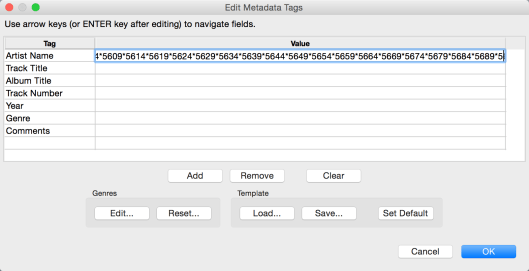
metadata10000

When I tried to move the cursor further to the right, the cursor moved off the window, and I couldn’t see any more of the string. Looks like I found a bug. I record the result in testclip, choosing the tag “obscured” to identify the particular failure. This may become important later if I find a different failure mode.

fail obscured
10000 recorded as fail obscured

Due to the nature of the counterstring, I already had it pretty well isolated – it’s likely that my boundary is between 5690 and 5691 characters. But let’s make sure. I generated a 5690-character counterstring, find that it works fine, and recorded that as a pass.

cs 5690
counterstring 5690 characters long loaded on the clipboard

pass
5690 recorded as pass

I can ask testclip to report the test results it knows about and automatically identify where the boundaries between different results are.

status
10: pass
5690: pass
--boundary 1
10000: fail obscured

Next I tried 5691. This failed as with the 10,000 character string. I recorded this as the same type of failure and show the status again, which shows that testclip puts 5691 and 10,000 in the same equivalence class, just as it did with 10 and 5690 (I’m hoping it’s not confusing to call this an “equivalence class”, which is a term usually used to describe expected results, not actual results).

cs 5691
counterstring 5691 characters long loaded on the clipboard

fail obscured
5691 recorded as fail obscured

status
10: pass
5690: pass
--boundary 1
5691: fail obscured
10000: fail obscured

So, I hadn’t needed to bisect anything yet. I decided to make the test more interesting by saving the project and opening it again, to see if the long string is saved and loaded properly. I went back to 5690 and did the save and load test. Note that generating a new counterstring would reset the bisection status in perlclip, but all the test results are still retained in testclip so I can track multiple failure points. And in fact, the test fails, because after I open the saved file, the field is completely empty.

So now I abuse the tool just a bit, changing the result of the 5690 test. I’m actually running a slightly different test now, but I think I can keep it all straight. I tag this new failure “empty”. I now have two boundaries:

cs 5690
counterstring 5690 characters long loaded on the clipboard

fail empty
5690 result changed from pass to fail empty

status
10: pass
--boundary 1
5690: fail empty
--boundary 2
5691: fail obscured
10000: fail obscured

I have no clue where the new boundary 1 lies, so I’ll use bisection to find it:

bisect 1
highest value for 'pass': 10
lowest value for 'fail empty': 5690
2850 characters loaded on the clipboard

This test also failed, so I recorded the result and bisect again.

fail empty
2850 recorded as fail empty

bisect 1
highest value for 'pass': 10
lowest value for 'fail empty': 2850
1430 characters loaded on the clipboard

To complete the bisection, I repeated this process: do the next test, record the result, and bisect again. This was the end result:

bisect 1
Boundary found!
highest value for 'pass': 1024
lowest value for 'fail empty': 1025

status
10: pass
720: pass
897: pass
986: pass
1008: pass
1019: pass
1024: pass
--boundary 1
1025: fail empty
1027: fail empty
1030: fail empty
1075: fail empty
1430: fail empty
2850: fail empty
5690: fail empty
--boundary 2
5691: fail obscured
10000: fail obscured

I reported the two bugs to the Audacity project, and called it a success. Note: this was a case of a moving boundary – on two previous days of testing, the failure point was at 1028 and 1299, though within each test session I didn’t observe the boundary moving.

Besides adding the rest of the perlclip features and porting to Windows, the next things I’d like to implement for testclip are snapping the bisection to powers of 2 and multiples of 10, since bugs tend to lurk in those spots, and finishing a feature that can bisect on integer values in addition to counterstrings.

For more about perlclip, see “A Look at PerlClip” (free registration required).

photo credit: Wajahat Mahmood

Recent Posts

  • Seeking the Inner Ring – Revisited
  • Use Your Unit Tests, or Else
  • Open-Minded Networking
  • Design Evolutions Doomed to Never Finish
  • Adventures in Personal Library Management

Recent Comments

Danny R. Faught's avatarDanny R. Faught on Seeking the Inner Ring –…
coutré's avatarcoutré on Seeking the Inner Ring –…
Danny R. Faught's avatarDanny R. Faught on Use Your Unit Tests, or E…
coutré's avatarcoutré on Use Your Unit Tests, or E…
Five for Friday… on Four Years after the 343

Archives

  • October 2025
  • September 2025
  • March 2025
  • August 2024
  • July 2024
  • June 2024
  • May 2024
  • March 2024
  • February 2024
  • February 2022
  • September 2021
  • August 2020
  • July 2020
  • February 2019
  • December 2018
  • October 2018
  • August 2018
  • June 2018
  • March 2018
  • February 2018
  • October 2017
  • September 2017
  • May 2017
  • August 2016
  • July 2016
  • June 2016
  • May 2016
  • September 2013
  • August 2013
  • November 2006
  • April 2003

Categories

  • archive
  • career
  • Jerry's story
  • life
  • security
  • software-development
  • technology
  • testing
  • travel

Meta

  • Create account
  • Log in
  • Entries feed
  • Comments feed
  • WordPress.com

Blog at WordPress.com.

  • Subscribe Subscribed
    • swalchemist
    • Join 25 other subscribers
    • Already have a WordPress.com account? Log in now.
    • swalchemist
    • Subscribe Subscribed
    • Sign up
    • Log in
    • Report this content
    • View site in Reader
    • Manage subscriptions
    • Collapse this bar
 

Loading Comments...